

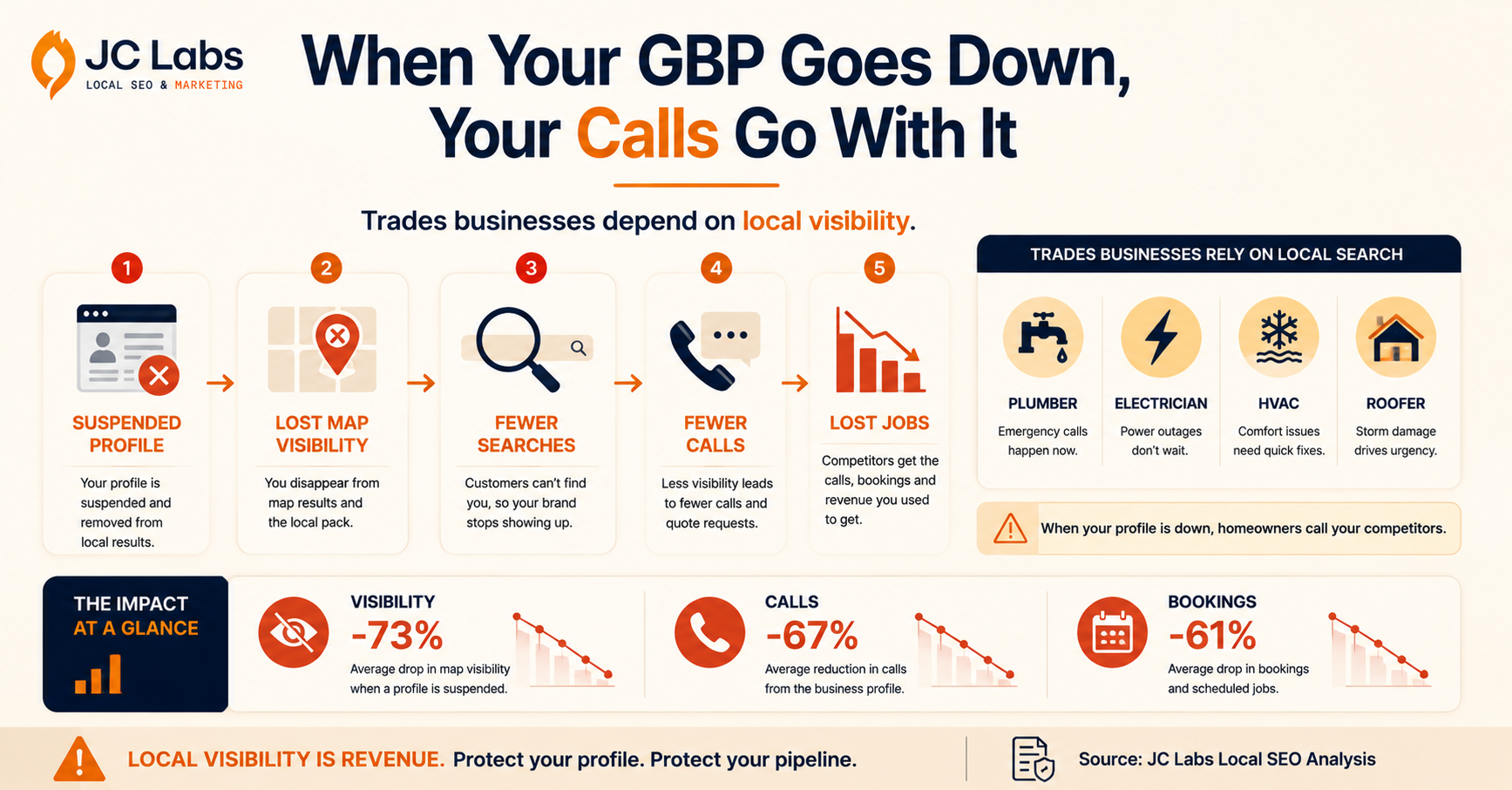
If your Google Business Profile has ever been suspended, you know the feeling. Your listing goes dark. Calls stop. Directions requests vanish. Bookings dry up. And then you hit the appeal process.
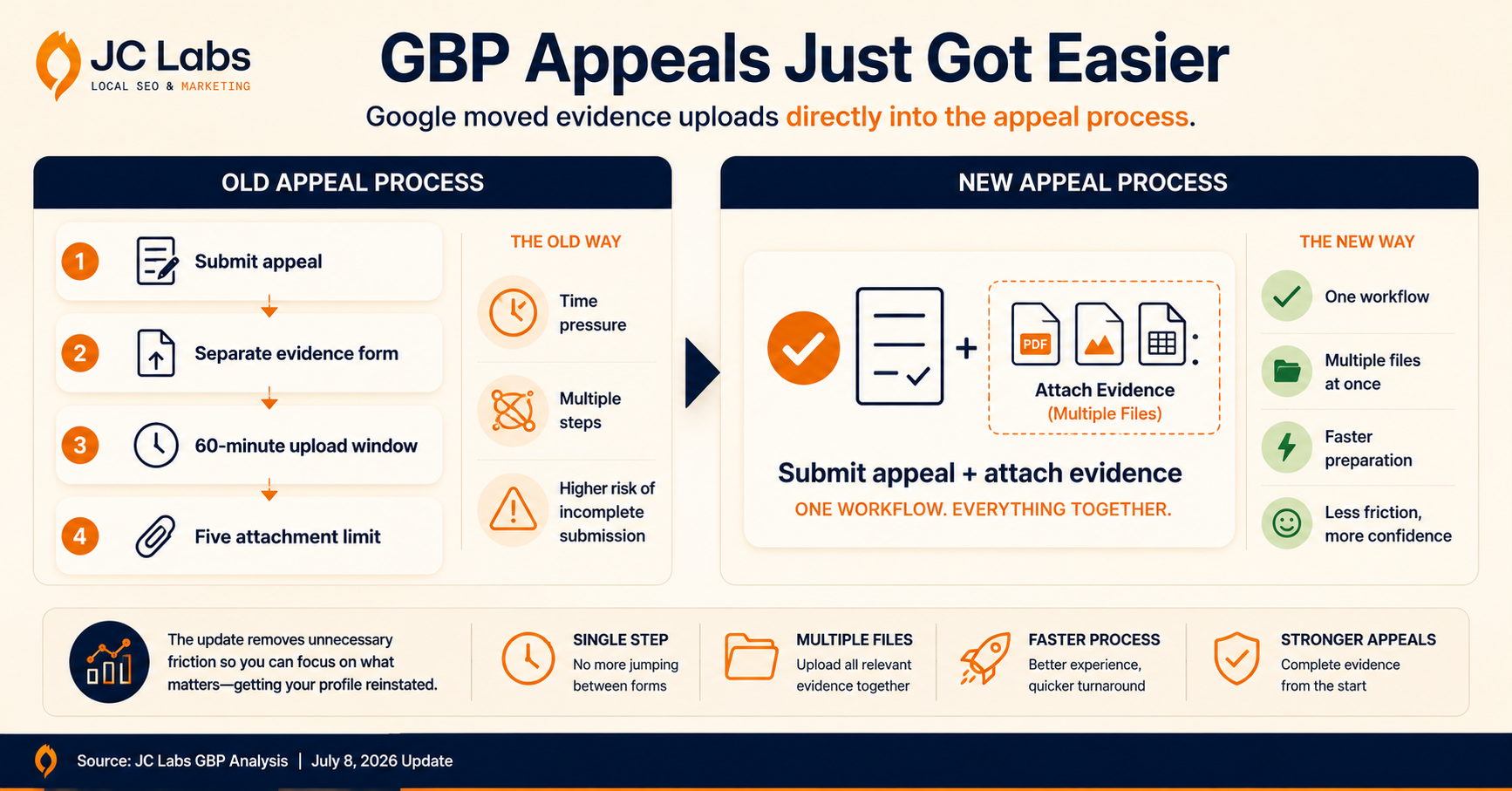
Until recently, that meant submitting your case and then scrambling to upload evidence through a separate form. You had a strict 60-minute window and only five attachment slots. For a local service business in Vancouver or the Lower Mainland, every hour a profile stays down is lost revenue.
A plumber losing map visibility during spring runoff season. A roofer disappearing right after a windstorm hits Burnaby. An electrician getting outranked by three competitors while Google sits on their paperwork. These are not hypotheticals. GBP suspensions hit trades businesses harder than most because trades live and die by local search. When a homeowner types "emergency plumber near me" and your profile is nowhere to be found, that call goes to someone else.
The old appeal process was a source of real frustration. Business owners would submit their appeal, realize they needed to gather documents, and then burn half their 60-minute window just figuring out what to upload. Five attachment fields meant tough choices about which documents to prioritize. Miss the window and your appeal went in incomplete. You could not resubmit the same appeal. You had to wait for a decision that was never coming, then start the whole process over.
That changed on July 8, 2026. Google updated the Business Profile appeal workflow so evidence documents now attach directly inside the appeal form itself. One step, one form, one upload button that accepts multiple files. The separate post-submission evidence form with its ticking clock is gone.
It is a narrow change, but for anyone who has gone through a suspension, it matters. Here is exactly what changed, what stayed the same, and how to prepare a bulletproof appeal.
How the Google Business Profile Appeal Process Changed
Before July 8, appealing a suspended profile took two disconnected steps:
- Submit the appeal through the main form.
- Open a separate evidence form and upload documents within 60 minutes, one file per field, across five fields.
If you missed that 60-minute window or fumbled the upload, your appeal went in weaker. Google warns against re-appealing the same issue before a decision lands. So a blown evidence step meant days or weeks of lost visibility while you waited for the first appeal to resolve before you could try again. Many business owners learned this the hard way, scrambling for documents while the clock ticked down in a browser tab they could not afford to close.
The new flow eliminates that entirely. A single button inside the appeal form lets you select and attach multiple files at once. Evidence travels with the appeal. No separate form, no second race against the clock, no panic-inducing timer. You submit everything in one go and the documents follow your case automatically.
Local SEO practitioner Stefan Somborac spotted the change and documented it on X, noting that the old process was "2 clunky steps" and the new one consolidates everything into one. Vinay Toshniwal independently confirmed the update and added that the bulk reinstatement question for 10 or more locations now appears at the start of the appeal instead of buried at the end. Search Engine Roundtable picked up the story the same day, confirming the change had gone live across all regions.
What Did NOT Change About GBP Appeals
The workflow got smoother. The rules did not. Google still accepts the same categories of evidence for a Google Business Profile suspension appeal:
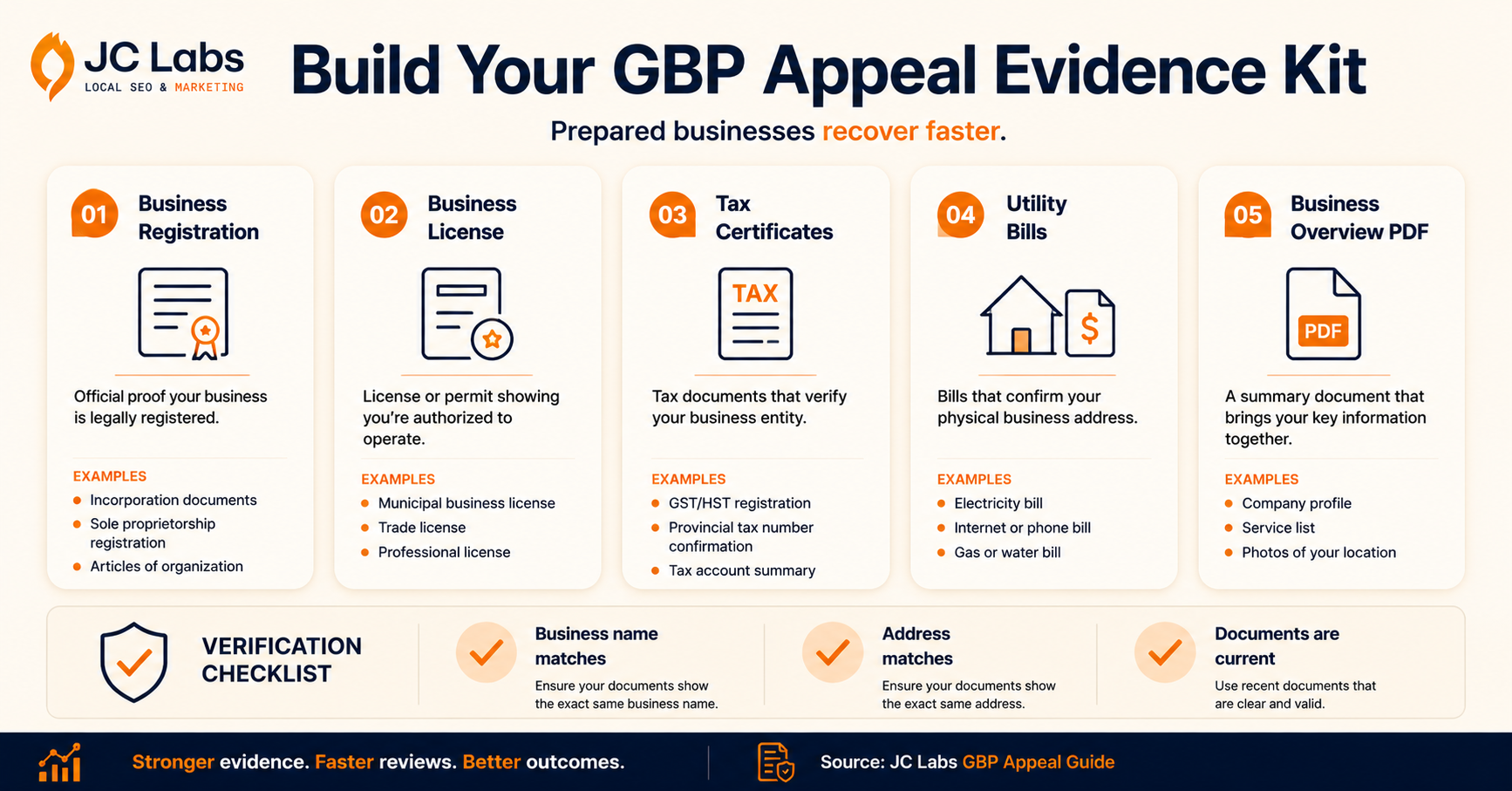
- Official business registration. Company formation documents showing name and address matching your profile. This is the strongest general-purpose proof that your business legally exists at the claimed identity. In BC, that means your incorporation documents or sole proprietorship registration from the BC Registries.
- Business license. Industry or municipal licensing that ties the business to its name and location. Especially relevant for trades in regulated categories like electrical, plumbing, gas fitting, and construction. Your City of Vancouver business license or municipal permit qualifies here.
- Tax certificates. Tax registration documents that corroborate the legal entity behind the profile. Useful as a second document alongside registration or license. Your GST/HST registration or BC PST number document works.
- Utility bills. Electricity, phone, cable, or internet bills that anchor the physical address. This is often the simplest document to update if your business records need refreshing. Telus business internet bills, BC Hydro statements, or FortisBC gas invoices are all valid.
The non-negotiable condition on all of them: the name and address on every document must exactly match what is on your Google Business Profile. A pristine business license with a slightly different trading name helps less than a boring utility bill that matches perfectly. Google's automated systems check this first. If your documents do not match at the system level, a human reviewer never sees your case.
Google's stated review window remains up to 5 business days. Real-world timelines from practitioners range from a few days for straightforward cases to 14-20 business days for complex suspensions involving address changes or service area disputes. The preparation you do before submitting is what determines which end of that range you land on.
And the warnings still apply:
- Do not create a new profile for the same business while your appeal is under review. Google flags duplicate listings, and a fresh suspension on a new profile complicates everything.
- Do not submit multiple appeals for the same issue before a decision lands.
Both moves feel productive during a stressful outage. Both actively work against reinstatement.
Why Google Business Profile Enforcement Is Getting Tougher
The appeal process update comes against a backdrop of aggressive enforcement from Google that has been ramping up steadily for years. In April 2026, Google published its Maps trust and safety report for 2025. The numbers explain why legitimate businesses keep getting caught in the machinery:
- 292 million policy-violating reviews blocked or removed in a single year
- 13 million+ fake Business Profiles removed from Maps
- Gemini AI models now screening every profile edit for accuracy
- Over 1 billion helpful reviews published in the same period, meaning the filtering systems process an enormous volume of content before anything goes live
When you are blocking and removing at that scale, false positives are inevitable. A perfectly legitimate business can get flagged by the same automated systems catching the fakes. A home services company with a new office address might trigger a suspicious location alert. A contractor who updated their phone number could get caught in a verification flag. A roofer with seasonal address changes might look like a shell operation to an algorithm trained to spot shell operations.
That makes knowing how to appeal a suspended Google Business Profile an operational skill, not a once-in-a-while problem. The businesses that bounce back fastest are the ones with their evidence organized before the suspension email ever arrives. The ones that scramble lose weeks of visibility.
How to Prepare Your GBP Appeal Evidence
The biggest mistake business owners make is starting the appeal process without their documents ready. Even with the streamlined flow, you want everything assembled before you touch the form. Preparation determines outcome. Here is the prep checklist:
Collect matching documents. Gather at least two documents from the accepted evidence list. The strongest combination is business registration plus a utility bill. Both must show your exact business name and address as it appears on your GBP. If your business address recently changed, update your utility bills and registration documents before you appeal, not after. A single mismatch at the system level will flag your case for manual review, adding days to the timeline.
Create a business overview document. Combine your business name, phone number, address, website URL, and Business Profile ID into a single PDF. Google's support experts recommend this as a primary document alongside your evidence. It gives reviewers a quick reference point before they dig into supporting files and shows you understand what they are looking for.
Verify your address everywhere. Before appealing, make sure your business address is consistent across your website, your GBP, and all your evidence documents. Address mismatches are the single most common reason appeals get denied. Check your website footer, your contact page, your GBP settings, and every document you plan to submit. One stray character difference can flag an automated review. If your website says "Unit 102" but your utility bill says "Suite 102", fix that before you appeal.
Know your Profile ID. You can find your Google Business Profile ID by logging into your GBP dashboard and checking the URL or the settings section. Having it ready saves time and prevents errors when filling out the form.
Check your category and service list. Incomplete GBP categories are a common suspension trigger. Make sure your primary and secondary categories accurately reflect what you actually do. A plumber listed under "handyman services" is more likely to trigger a review than one listed under "plumber." Google's systems compare your category to the services you offer and flag mismatches.
Keep your evidence prepped year-round. The best approach is to maintain a digital folder with your current registration, license, and a recent utility bill at all times. When a suspension hits, you want to appeal the same day, not spend a week tracking down documents. This simple habit can save you weeks of lost visibility.
How to Prevent a Google Business Profile Suspension
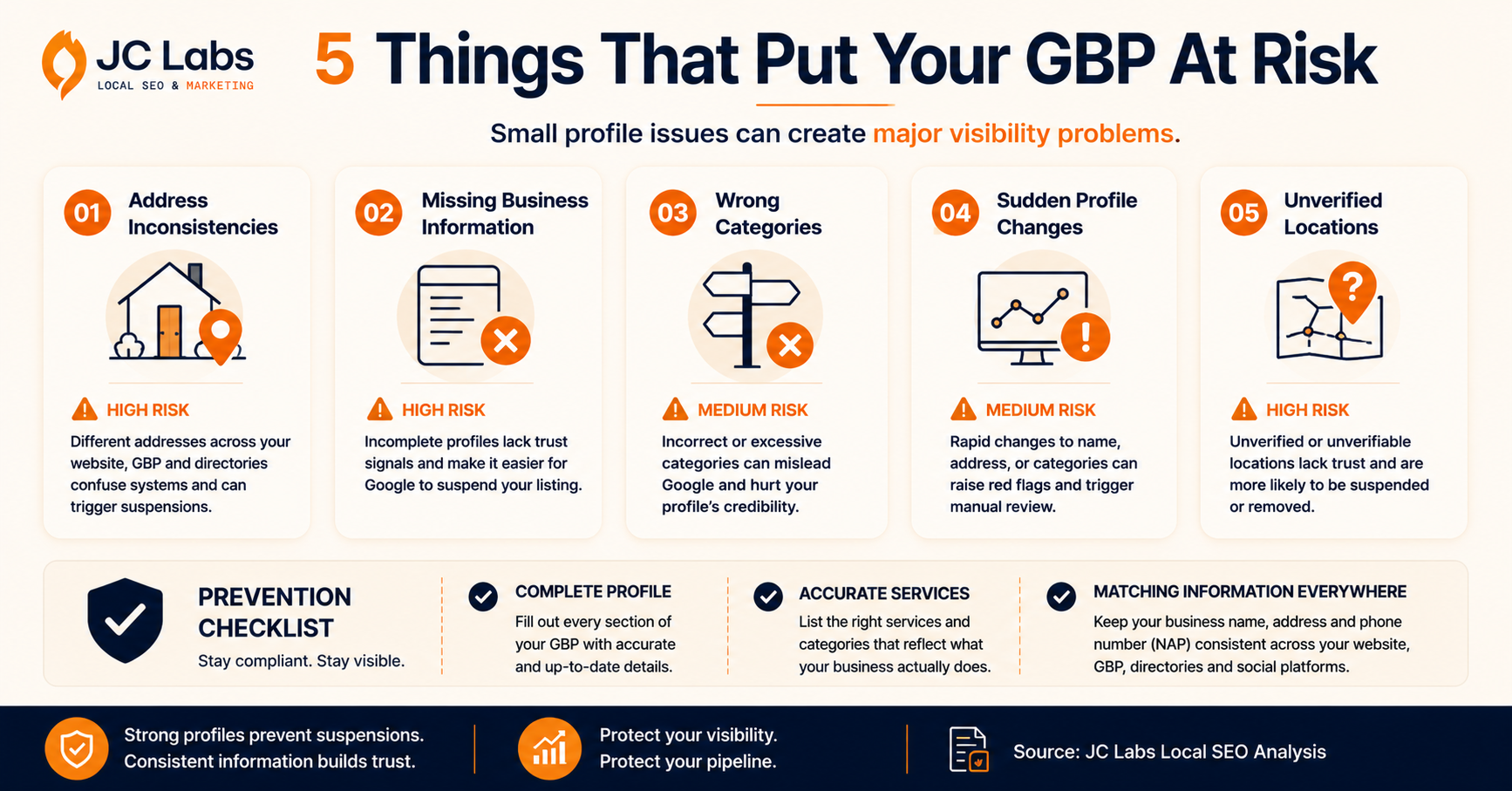
The cleanest appeal is the one you never need to file. Most GBP suspensions stem from issues you can fix today:
- Address inconsistencies between your GBP and your website or other directories
- Profile incompleteness, such as missing hours, categories, or service listings
- Category mismatches where your listed category does not match your services
- Rapid changes to profile information that trigger Google's abuse detection
- Operating from a residential address without proper verification documentation
Completing your profile fully and reviewing it quarterly is the single best way to avoid suspension triggers. After the March 2026 core update, GBP completeness became a more direct ranking input anyway. So maintaining a fully filled-out profile helps your search visibility even when no suspension is at play.
Frequently Asked Questions
What evidence does Google accept for a Business Profile appeal? Google accepts four categories of evidence: official business registration, business license, tax certificates, and utility bills. All documents must show the exact business name and address as it appears on your profile.
How long does a GBP appeal take? Google says up to 5 business days. Real-world timelines range from a few days to 14-20 business days for complex cases involving address changes or service area disputes.
Can I create a new profile while my appeal is pending? No. Google warns against creating duplicate profiles for the same business while an appeal is under review. The duplicate can get flagged and suspended too.
What changed in the GBP appeal process on July 8, 2026? Evidence documents now attach directly inside the appeal form using a single multi-file upload button. The old process required submitting the appeal first and then uploading evidence through a separate form with a 60-minute window and five individual attachment fields.
This is not a policy change. Google is still looking for the same evidence and applying the same standards. But the process itself just became less painful. One form, one upload, no separate 60-minute scramble. For multi-location businesses, the bulk reinstatement question appearing at the start of the flow instead of the end is an equally meaningful improvement.
For local businesses in Vancouver and the Lower Mainland, a suspended profile can mean losing calls and bookings for weeks. If your GBP goes down, knowing how to appeal with well-prepared evidence is the fastest path back to showing up in search. But the real move is preventing the suspension in the first place. Most GBP suspensions stem from address inconsistencies, incomplete profiles, or category mismatches. These are easy to fix when you know where to look.
Visit thejclabs.com to learn how we can help your business get found, trusted, and chosen.Frequently Asked Questions
What evidence does Google accept for a Business Profile appeal? Google accepts four categories of evidence: official business registration, business license, tax certificates, and utility bills. All documents must show the exact business name and address as it appears on your profile.
How long does a GBP appeal take? Google says up to 5 business days. Real-world timelines range from a few days to 14-20 business days for complex cases involving address changes or service area disputes.
Can I create a new profile while my appeal is pending? No. Google warns against creating duplicate profiles for the same business while an appeal is under review. The duplicate can get flagged and suspended too.
What changed in the GBP appeal process on July 8, 2026? Evidence documents now attach directly inside the appeal form using a single multi-file upload button. The old process required submitting the appeal first and then uploading evidence through a separate form with a 60-minute window and five individual attachment fields.
How The JC Labs Can Help
Everything above is the kind of work we do for trades businesses across Vancouver and the Lower Mainland every week. If your profile is suspended right now, or you just want to make sure it never happens, here is where we come in:
Suspension recovery, handled end to end. We audit your business registration, license, and utility bills against your GBP listing, catch any name or address mismatches before Google's system does, and put together your evidence and business overview document so your appeal goes in clean the first time.
Fast turnaround. Because we already know what Google's reviewers are checking for, we can often get an appeal submitted the same day your profile goes down, instead of losing a week figuring out what to gather.
Suspension-proofing. We run quarterly GBP audits that catch the address inconsistencies, incomplete categories, and profile gaps that trigger suspensions in the first place, so there is no appeal to file.
Ongoing local SEO management. Beyond keeping your profile in good standing, we manage the local SEO work that gets trades businesses found first when a homeowner searches "emergency plumber near me" or "roofer near me."
If your listing is down right now, every day it stays that way is a day your competitors show up instead of you. We can help you fix it, and help make sure it does not happen again.
This is not a policy change. Google is still looking for the same evidence and applying the same standards. But the process itself just became less painful. One form, one upload, no separate 60-minute scramble. For multi-location businesses, the bulk reinstatement question appearing at the start of the flow instead of the end is an equally meaningful improvement.
For local businesses in Vancouver and the Lower Mainland, a suspended profile can mean losing calls and bookings for weeks. If your GBP goes down, knowing how to appeal with well-prepared evidence is the fastest path back to showing up in search. But the real move is preventing the suspension in the first place. Most GBP suspensions stem from address inconsistencies, incomplete profiles, or category mismatches. These are easy to fix when you know where to look.
Is your Google Business Profile suspended right now, or overdue for an audit? Visit https://www.thejclabs.com/ and let's get your business found, trusted, and chosen, starting with getting your listing back online.