

A website tag records a form fill. The business records a booked job worth four hundred dollars, three days later. Google Ads has been bidding on the first number and ignoring the second, which is why so many local ad accounts look profitable in the platform and disappointing in the bank.
Google has now documented a beta that closes part of that gap. PPC News Feed reported on September 21, 2026 that Google expanded its help page for multi-source conversions, adding a section called "Boost your tag with additional data sources (beta)." The update was spotted by Hana Kobzová. It is help documentation for a beta, not a launch, so nothing is guaranteed, but the mechanics are specific enough to act on.
What the beta actually does
It connects your backend to a conversion action
Multi-source conversions let you connect an additional data source, meaning a backend system like a CRM or an order database, to a website conversion action that runs on the Google tag or Google Tag Manager. Data goes in through Data Manager or the Data Manager API.
Two limits are worth knowing up front. It only works with website conversion actions set up manually in code, so imported Google Analytics conversions and URL based conversion actions are out. And it is in beta, so it may not be available in your account yet.
Matched records get repaired, unmatched records become new conversions
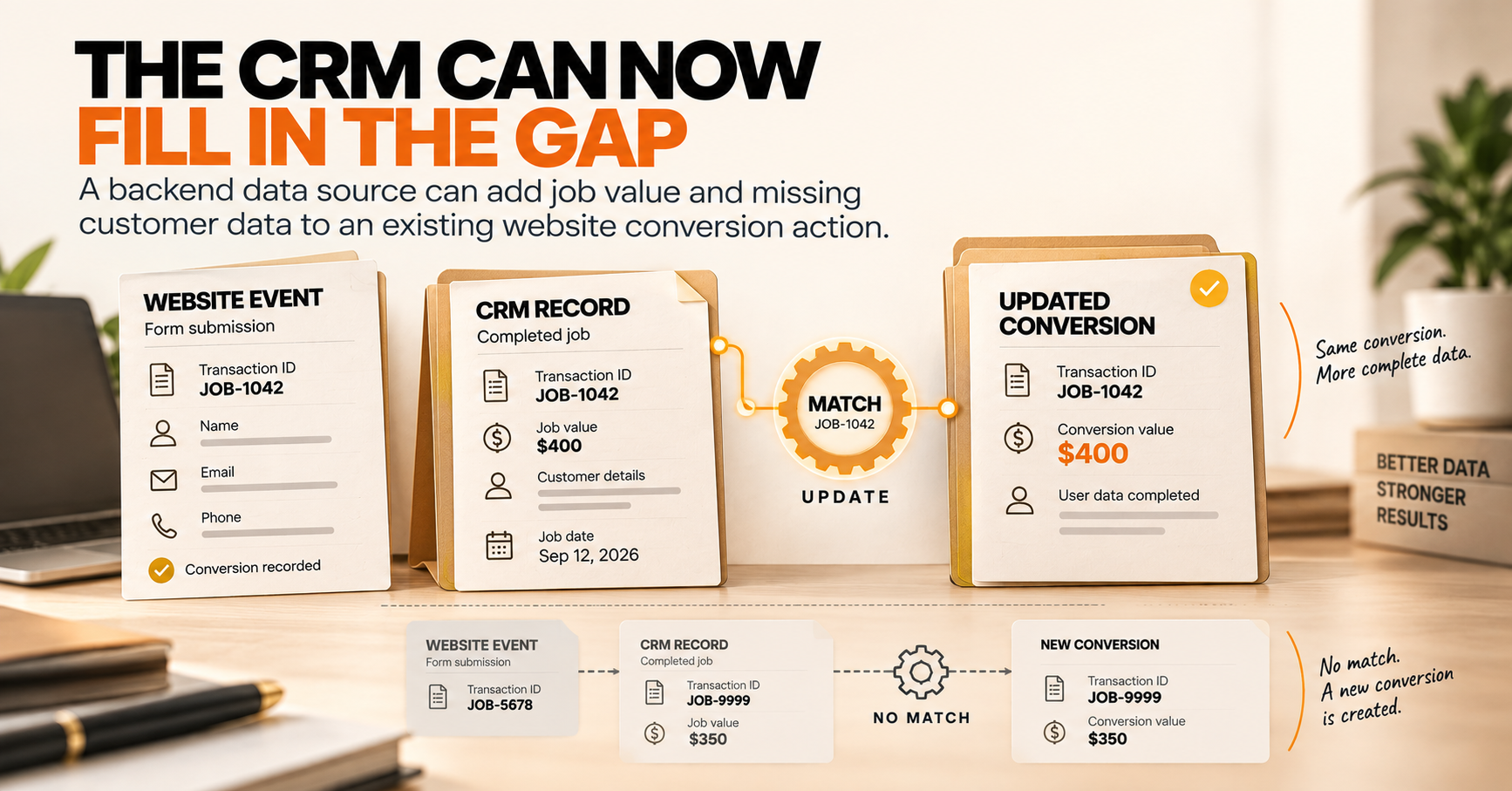
Google matches uploaded rows against tag events using the transaction ID, which is your order or job identifier.
When a transaction ID matches an event the tag already recorded, two things can happen. The conversion value from your upload permanently overwrites the value the tag captured, which is how a restatement, an upsell, or a finalized total reaches Google. User provided data the tag failed to capture, such as email or phone, gets filled in from the upload. Everything else on that row, including the click ID, is ignored.
When a transaction ID does not match anything, Google creates a new conversion event and tries to attribute it using the identifiers you sent.
Why this matters more for local businesses
The tag never sees the job
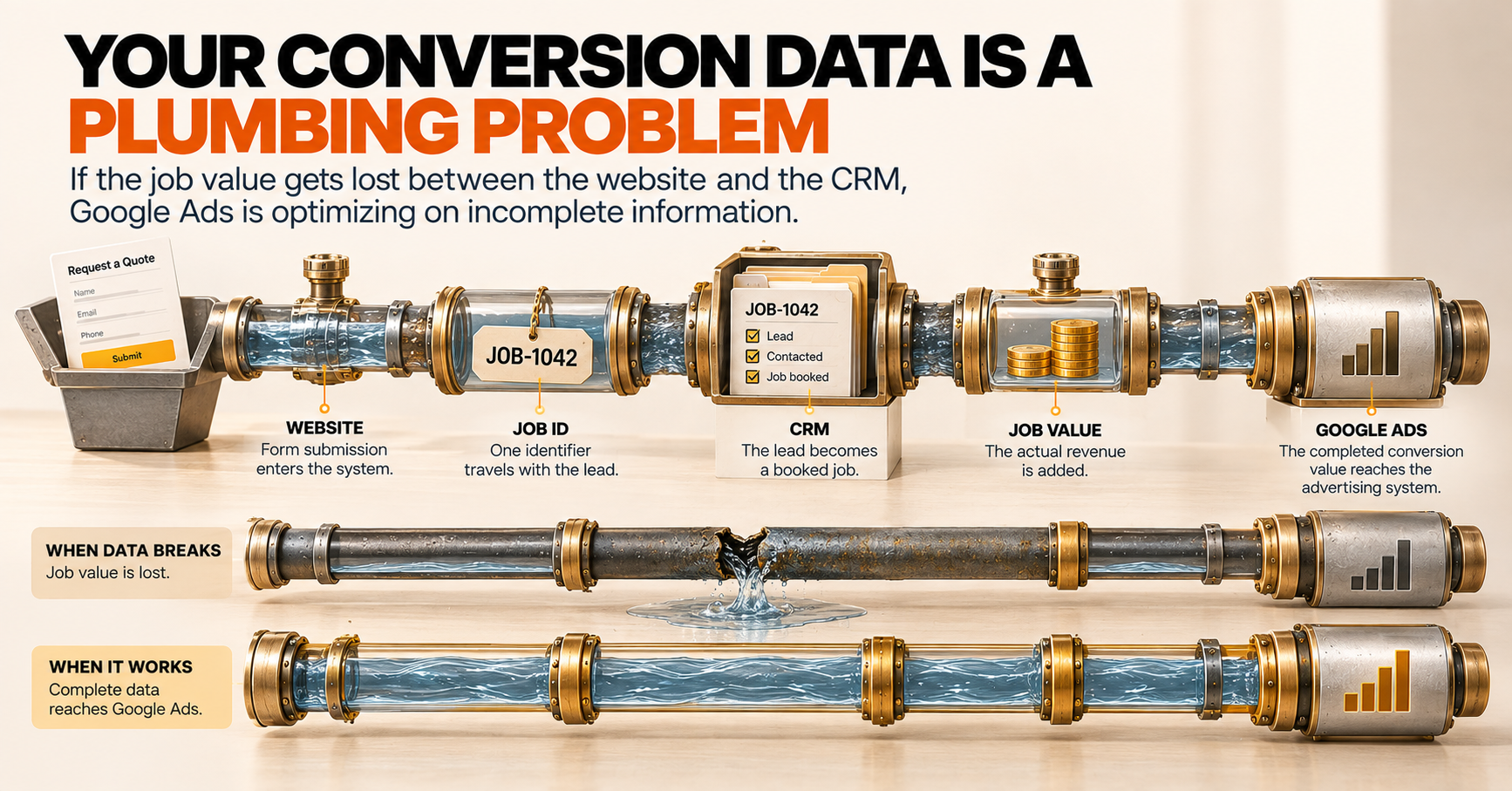
A local lead arrives as a call or a form. The job gets booked later, over the phone or in person. The tag sees the contact, not the revenue, and revenue is the only number that decides whether the advertising worked.
That is why so many local accounts run on partial data. Google knows a form was submitted. It does not know the form became a six thousand dollar installation.
Conversion value is the input smart bidding uses
For value based bidding, the uploaded value becomes the source of truth and permanently replaces the tag value on matched records. That cuts both ways. Feed it accurate job values and bidding starts chasing revenue instead of volume. Feed it cents where the tag reports dollars and you inflate every conversion, which is a documented way to mislead the bidding system badly.
The details that decide whether this works
Transaction ID must match the tag
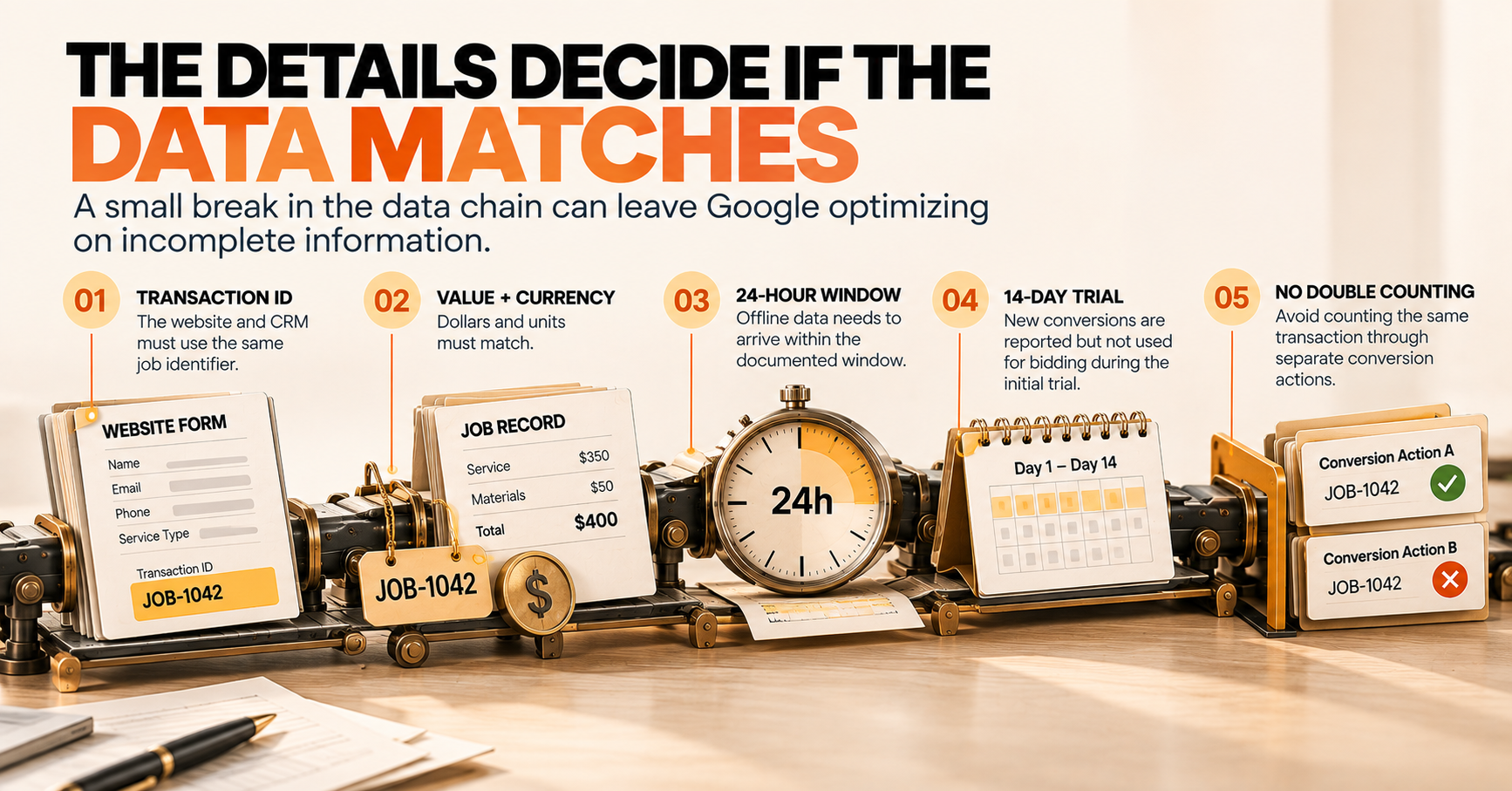
The transaction ID is the key used to deduplicate and match records. If your form sends one identifier and your CRM stores another, nothing matches and nothing gets repaired.
Units and currency must match
If the tag reports dollars and the upload reports cents, a ten dollar conversion arrives as a thousand. Set NULL when you do not want to update a value, because any number you send, including zero, will be applied.
The upload window is short
User provided data is supplemented only when the offline upload arrives within 24 hours of the initial tag event. A weekly CRM export will miss most of this benefit.
The first 14 days are a trial
While a conversion action is inside its initial 14 day trial, value updates are disabled and newly created conversions are not used for bidding, though they do appear in reporting. Do not judge the setup inside that window.
Do not double count
Google removes duplicates within a single conversion action, not across two. If you create a new action for this and leave the old one in the same campaign goal set, one transaction can be counted twice. Attaching the data source to your existing conversion action is the recommended path.
A pre-flight checklist
- One conversion action per goal, with the data source attached to the action you already use
- One job identifier that exists in both the tag and the CRM, used as the transaction ID
- Click ID capture on every lead form, written into the CRM record
- Hashed email or phone on the upload as backup attribution, since Google recommends sending both
- One currency and one unit across both sides
- Daily uploads, comfortably inside the 24 hour window
- Consent values per row, so only consented conversions are used
- Diagnostic alerts monitored, not ignored
How we run this
We treat conversion data as a plumbing problem, because that is what it is:
- A job ledger where every lead and every completed job carries one identifier from the website through the CRM
- Click ID capture wired into the forms, so attribution survives the trip
- Value mapping in one currency with NULL fallbacks, so a missing job value never becomes a zero dollar conversion
- Daily syncs scheduled well inside Google's upload window
- A trial calendar per conversion action, so nobody reacts to the 14 day blind spot as if it were a performance problem
- Diagnostic alert monitoring, so a broken mapping gets fixed in hours instead of poisoning bidding data for a month
If your ad account reports conversions and your CRM reports jobs, and those two numbers have never matched, that is the gap worth closing before you move another dollar of budget. It sits next to everything else on our Google Ads service.
FAQ
What are multi-source conversions in Google Ads?
A beta feature that connects an additional data source, such as a CRM, to a website conversion action, so backend data can fill in missing user information and replace the conversion value the tag recorded.
Is this available to everyone?
No. It is in beta and only works with website conversion actions set up manually through the Google tag or Google Tag Manager. Imported Google Analytics conversions and URL based conversion actions are not supported.
Does the uploaded value really override the tag?
Yes. On matched records the uploaded value permanently overwrites the tag value. Zero is treated as valid, so use NULL when you do not intend to change a value.
Why does the 24 hour upload window matter?
Offline data supplements missing user information only when it arrives within 24 hours of the tag event, so slower exports reduce the benefit.
Why were my new conversions not used for bidding?
Conversion actions in their first 14 day trial show new conversions in reporting but do not use them for bidding, and value updates are disabled during that period.
The bottom line
Google just documented the route that lets a local business tell Google Ads what a job was worth, instead of what a form submission looked like. Businesses that wire this up bid on revenue. Everyone else keeps optimizing toward contact forms.
If your conversion numbers and your job numbers have never agreed, that is the problem worth fixing first.